



A merchant ID (MID) is the unique numeric identifier that payment networks use to route and settle card transactions to your specific merchant account. Your acquiring bank or payment processor assigns it the moment you open a merchant account. You cannot accept or receive card payments without one.
Three things to do right now if you need your MID:
- Check your processor dashboard — log in, go to Account Settings or Merchant Profile, and look for “Merchant ID” or “MID.”
- Pull your monthly merchant statement — the MID is printed in the upper-right corner of most statements.
- Call your merchant services provider — have your legal business name and EIN ready; they can look it up in seconds.
A masked MID looks like this on statements and receipts: *******12345. The full number is typically 15 digits, but your processor may display only the last four or five for security.
Providers like Stripe, Bank of America Merchant Services, Tidal Commerce, and Card Service Professionals all issue MIDs through their respective acquiring relationships. The process and timeline differ, but the underlying identifier works the same way across all of them.
Pro Tip: Save your MID and Terminal ID (TID) in a dedicated folder in your accounting software the day you receive your onboarding email. Hunting for them during a chargeback dispute costs time you won’t have.
Table of Contents
- How merchant IDs move through the payment system
- Why your business cannot operate without a merchant ID
- How to get a merchant ID for your business
- Where to find your merchant ID right now
- What merchant IDs actually look like
- How a merchant ID differs from your other business numbers
- Who should have your merchant ID, and who should not
- Questions to ask your merchant services provider about your MID
- Key Takeaways
- How Card Service Professionals approaches MID onboarding
- Card Service Professionals can help you get your MID sorted
- Useful sources and official documentation
How merchant IDs move through the payment system
Every card transaction your business processes carries your MID from start to finish. Here is the path it travels:
- A customer taps or swipes at your POS terminal or enters card details in your online gateway.
- The terminal or gateway sends the transaction data, including your MID, to your acquirer or processor.
- The processor routes the transaction through the card network (Visa, Mastercard, etc.) to the customer’s issuing bank for authorization.
- The issuing bank approves or declines, and the response travels back through the same chain.
- At settlement, the card network uses your MID to push funds to the correct merchant account at your acquiring bank.
The MID does more than just route money. Processors use it for reconciliation, tying each batch of transactions to your account at the end of the day. It also anchors dispute and chargeback tracking — when a customer disputes a charge, the card network references the MID and the transaction ID to assign liability to the right merchant.
One MID can have multiple Terminal IDs (TIDs) attached to it. If you run three registers in one store, each register gets its own TID, but they all report under the same MID. That structure keeps device-level reconciliation clean while keeping your account unified.

Pro Tip: When you contact support about a settlement delay or a disputed charge, give them your MID, the specific TID, and the transaction ID together. That combination cuts resolution time significantly compared to providing just one of the three.
Why your business cannot operate without a merchant ID
No MID means no card payments. That is the short version. The longer version is that the MID is the linchpin for several business-critical functions that go well beyond just accepting a swipe.
Here is what depends on it:
- Settlement: Funds from card sales are deposited to your bank account using the MID as the routing key. A missing or incorrect MID causes failed settlements and delayed deposits.
- Reconciliation: Your processor’s reporting ties every transaction batch to your MID, which is how your statements match your bank deposits.
- Chargeback handling: The MID identifies your account when a dispute is filed. Without it, the card network cannot route the chargeback to the right merchant.
- Risk and reputation tracking: Card networks and processors track chargeback ratios, fraud rates, and processing volume at the MID level. A high chargeback rate on your MID can trigger account review or termination.
- Multi-location reporting: A business with multiple stores can operate under one MID (consolidated reporting) or separate MIDs per location (granular reporting). The choice affects how you read your statements and how disputes are assigned.
A practical failure example: a retailer who migrates to a new processor without confirming the new MID is active in the gateway configuration will process transactions that appear authorized but never settle. Deposits stop. The fix is simple once identified, but the delay can run several business days.
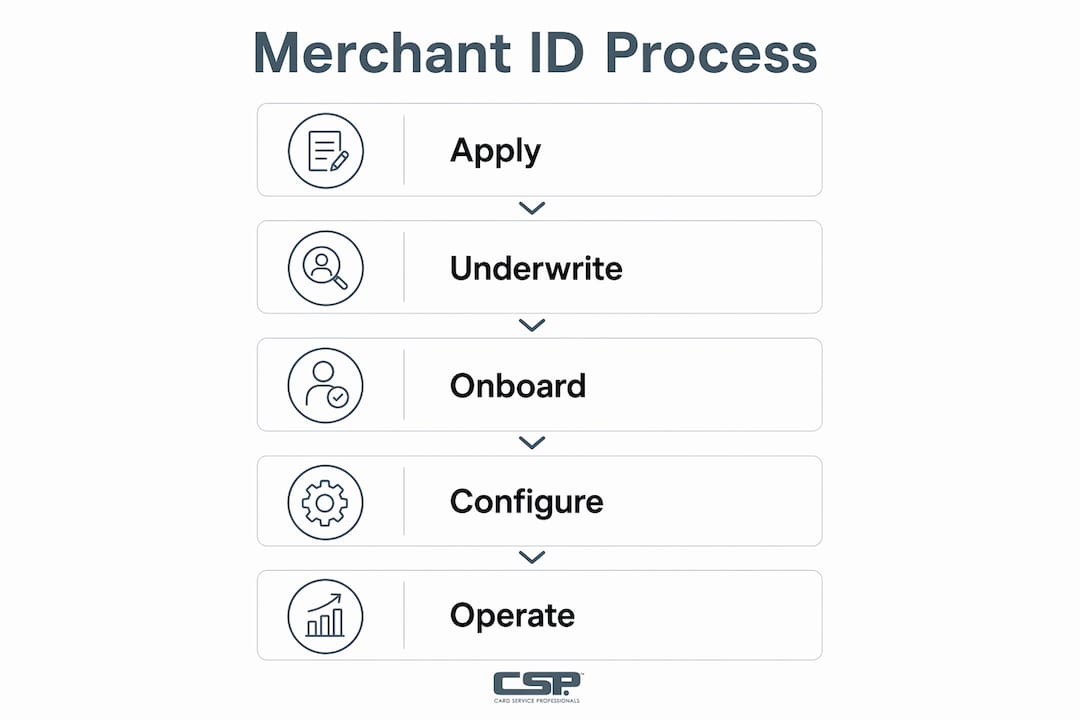
How to get a merchant ID for your business
You receive a MID when you open a merchant account with an acquiring bank or payment aggregator. The processor assigns it during underwriting. Here is how the process works, step by step.
Step 1: Choose your account type
- Payment aggregator (e.g., a shared-MID platform): fastest setup, often instant to 72 hours. You share a MID pool with other merchants. Good for low-volume or new businesses.
- Dedicated merchant account: your own single-merchant MID. Underwriting takes longer — typically several days to one or two weeks — but gives you more control over rates, reserves, and account stability.
Step 2: Gather your documentation
- EIN (Employer Identification Number) or SSN for sole proprietors
- Business bank account number and a voided check
- Government-issued photo ID (driver’s license or passport)
- Business license or articles of incorporation, depending on entity type
- Three months of recent processing statements if you are switching providers
Step 3: Submit your application and complete underwriting
The processor reviews your business type, processing history, and chargeback risk. Aggregators skip most of this. Dedicated accounts go through a full review.
Step 4: Receive onboarding documentation
Your MID and TID(s) arrive in your onboarding email or welcome packet. Configure them in your terminal or gateway before your first transaction.
Pro Tip: Ask your provider to confirm your MID and TID in writing during onboarding. Save that email. If your terminal is ever replaced or reconfigured, you will need those numbers to verify the setup is correct.
Where to find your merchant ID right now
The three fastest places to check are your payment processor dashboard, your monthly merchant statement, and your physical or virtual terminal.

Processor dashboard: Log in, navigate to Account Settings or Merchant Profile, and look for a field labeled “Merchant ID,” “MID,” or “Account Number.” Stripe users find it under the Dashboard’s account details. Bank of America Merchant Services displays it in the Merchant Help portal.
Monthly statement: Open the most recent statement and look at the upper-right header or the account summary block. The MID is usually labeled clearly.
Terminal or POS device: On most physical terminals, go to Settings → Device Info or About. The MID and TID are listed there. On a virtual terminal, check the account or profile settings within the software.
Gateway or API configuration: If you use a payment gateway, the MID may appear in the API credentials section or the merchant configuration file. Note that some gateways display a Gateway ID, which is separate from your MID. For more on how these identifiers interact in integrated setups, the payment integration guide covers the distinction in detail.
| Where to look | What you’ll see | Who to contact if missing |
|---|---|---|
| Processor dashboard | Full or masked MID in account settings | Processor support chat or phone |
| Monthly statement | MID in upper-right header | Merchant services rep |
| POS terminal | MID + TID in device info/settings | Equipment provider or processor |
| Virtual terminal | MID in account/profile settings | Processor support |
| Onboarding email | Full MID and TID listed | Check spam folder; then contact rep |
If you cannot find it in any of these places, call your processor’s merchant services line. Provide your legal business name, EIN, and the last four digits of your settlement bank account — that combination is enough for any support team to pull your MID immediately.
What merchant IDs actually look like
Most MIDs in the U.S. are numeric and commonly 15 digits long, though some processors use shorter or longer formats depending on their internal systems. The digits are not random: they typically encode an acquiring bank identifier, a merchant category, and a validation sequence.
A masked MID on a public receipt or statement looks like this:
*******12345
An unmasked illustrative example (for demonstration only — not a real MID):
123456789012345
A few things worth knowing about format variations:
- Some processors prefix the MID with a two- or three-digit bank code, which can make it appear longer than 15 digits in certain dashboards.
- Display formatting (dashes, spaces, or prefixes) does not change the underlying MID. Strip those out when entering it into a support form.
- Aggregator platforms sometimes show a sub-merchant ID rather than a true acquiring MID. If you are on an aggregator, ask your provider explicitly which number is your MID.
Pro Tip: Never post your full MID in a public forum, a social media post, or an unencrypted email. Treat it like semi-sensitive account data — share it only with your internal finance team, your processor, and vetted integration partners.
How a merchant ID differs from your other business numbers
The MID exists only inside the payment processing ecosystem. It is not interchangeable with your tax ID, your bank account number, or your terminal identifier, even though all four numbers relate to your business finances.
Here is where each one lives and what it does:
- MID vs. EIN: Your EIN (Employer Identification Number) is issued by the IRS and identifies your business for tax purposes. Your MID is issued by your acquirer and identifies your merchant account for payment routing. They serve entirely different systems. When a tax authority asks for your business ID, give them the EIN. When a payment processor asks, give them the MID.
- MID vs. bank account number: Your bank account number is where funds are held. The MID tells the payment network which merchant account to send those funds to. You can verify bank account details through services like bank account verification when setting up settlement routing.
- MID vs. Terminal ID (TID): The TID identifies a specific device or software instance. One MID can have many TIDs. Think of the MID as the store address and the TID as the register number inside that store.
- MID vs. Gateway ID: A payment gateway may assign its own internal identifier. That Gateway ID maps to your MID on the backend, but they are not the same number.
| Identifier | Issued by | Primary use | Scope |
|---|---|---|---|
| MID | Acquiring bank / processor | Payment routing and settlement | Payment ecosystem |
| EIN | IRS | Tax filing and business identity | Tax and legal systems |
| Bank account number | Your bank | Holding and transferring funds | Banking system |
| TID | Processor / equipment provider | Device-level transaction attribution | Individual terminal or software |
| Gateway ID | Payment gateway | Internal gateway routing | Gateway platform only |
Who should have your merchant ID, and who should not
Your MID is semi-sensitive. It is not a password, but it is not something to broadcast either. The right approach is controlled sharing with a short list of trusted parties.
Safe to share with:
- Your internal finance and accounting team
- Your payment processor or acquiring bank
- A vetted payment integration partner or developer configuring your gateway
- Your accountant, when reconciling merchant statements
Be cautious about:
- Unsolicited requests from vendors you did not contact first
- Listing sites or directories asking for your MID as part of a “verification” process
- Any request that comes by email without a prior relationship or a verifiable callback number
A red flag worth knowing: if a statement arrives with a merchant name that does not match your business, contact your processor immediately. That mismatch can indicate a configuration error or, in rare cases, account misuse. For a broader look at warning signs in payment processing, the payment processing red flags guide covers the most common ones merchants encounter.
Pro Tip: If you receive a suspicious request for your full MID from an unknown party, do not provide it. Contact your processor directly using the number on your statement, report the request, and ask whether a new MID can be issued if the old one was compromised.
Questions to ask your merchant services provider about your MID
Whether you are onboarding with a new processor or troubleshooting an existing account, these questions get you the information you need fast. You can read them aloud on a call or paste them into an email.
Core questions to ask:
- What is my full MID and all associated TIDs for this account?
- Am I on a shared (aggregator) MID or a dedicated single-merchant MID?
- What is my settlement schedule, and which bank account is tied to this MID?
- Who is my chargeback contact, and what is the process for responding to disputes?
- If I add a new location or terminal, will it get a new TID under the same MID, or a new MID entirely?
- How do I update my banking information if my settlement account changes?
Sample phrases for a phone call:
- “I need to confirm the MID and TID assigned to my account. Can you pull that up with my business name and EIN?”
- “I’m seeing a settlement delay. Can you check the status of batch [date] under MID [your number]?”
- “I received a request for my MID from a third party. Can you confirm whether that request came from your team?”
When a representative calls you, Card Service Professionals recommends verifying their identity before sharing any account details. Ask for their name, department, and a direct callback number, then hang up and call the main merchant services line to confirm. A legitimate rep will not object to that.
For a broader checklist of what to prepare before you call, the small business payment processing checklist covers documentation and account setup items in one place.
Key Takeaways
A merchant ID is your payment-network address for settlement — without it, card funds cannot reach your account, chargebacks cannot be routed correctly, and reconciliation breaks down.
| Point | Details |
|---|---|
| MID is your settlement address | Card networks use it to route funds to your merchant account; no MID means no card payments. |
| Find it in three places | Check your processor dashboard, the upper-right corner of your monthly statement, or your terminal’s device info. |
| One MID, multiple TIDs | Each terminal or register gets its own TID; all report under the same MID — know both when troubleshooting. |
| Keep it semi-private | Share your MID only with internal finance, your processor, and vetted integration partners; never post it publicly. |
| Card Service Professionals | Card Service Professionals assists U.S. merchants with account setup, MID and TID verification, and onboarding documentation. |
How Card Service Professionals approaches MID onboarding
Card Service Professionals works with U.S. merchants as an independent sales agent for several of the country’s leading merchant service providers. When a merchant comes to us asking whether to go with an aggregator or a dedicated merchant account, that is usually the first question we help them answer — and the answer depends on processing volume, business type, and how much account stability matters to them.
During onboarding, we make sure merchants receive their MID and TID in writing, understand which settlement account is linked, and know exactly who to call if a deposit does not arrive on schedule. That first settlement cycle is where most confusion happens, and having clear documentation prevents most of it.
A common question we field: “My processor gave me a number — is this my MID or my Gateway ID?” The answer matters because they are different identifiers that live in different systems. We walk merchants through confirming which is which and where each one appears in their dashboard and terminal settings.
Card Service Professionals also offers cash discount programs, competitive processing rates, and a full range of electronic payment options — so merchants are not just getting a MID, they are getting an account structure that fits how their business actually operates.
Card Service Professionals can help you get your MID sorted
Getting a merchant account and a confirmed MID does not have to be a multi-week process full of paperwork confusion. Card Service Professionals gives U.S. merchants a direct path: we match you with the right processor for your business type, handle the documentation checklist, and confirm your MID and TID are correctly configured before your first transaction runs.
Here is what working with Card Service Professionals covers:
- Merchant account setup and processor matching (aggregator vs. dedicated, based on your volume and risk profile)
- MID and TID verification during onboarding
- POS equipment provisioning and terminal configuration
- Settlement troubleshooting during your first billing cycle
- Ongoing support from a dedicated merchant services rep
Ready to get your merchant account and MID in place? Start your application today, or read the merchant services guide first if you want a broader picture of how payment processing works before you commit.
Useful sources and official documentation
These are the primary sources merchants can consult for official documentation, definitions, and account help:
- Stripe: Merchant ID guide — Stripe’s official explainer on what a MID is and how it appears in the Stripe dashboard; useful if Stripe is your processor.
- Bank of America Merchant Help: Merchant Identification Number — Bank of America’s official merchant help article on locating your MID within their portal.
- Tidal Commerce: Merchant ID Number — A clear explainer from Tidal Commerce covering MID basics and how to find yours.
- Forbes Advisor: What Is a Merchant ID? — Covers MID definition, lookup locations, and chargeback context in a format built for business owners.
- Razorpay: What Is a MID? — Detailed breakdown of MID format, TID differences, and security handling; note this source is India-based, but the technical definitions apply universally.
- SalesTaxcel: How Do I Get a Merchant ID Number? — Step-by-step onboarding guide covering aggregator vs. dedicated account timelines.
- Card Service Professionals: Merchant Account Explained — Internal resource covering how merchant accounts work for U.S. retail merchants, including how MIDs fit into the account structure.
- Card Service Professionals: What Is Merchant Services? — Broader guide on merchant services for U.S. retailers; a good next read after understanding your MID.
Recommended
- Merchant Account Explained for U.S. Retail Merchants – Card Service Professionals
- What Is Merchant Services? A Guide for U.S. Retailers – Card Service Professionals
- Payment Integration Explained for U.S. Retail Merchants – Card Service Professionals
- Visa and Mastercard Network Fees Explained for Merchants – Card Service Professionals
