



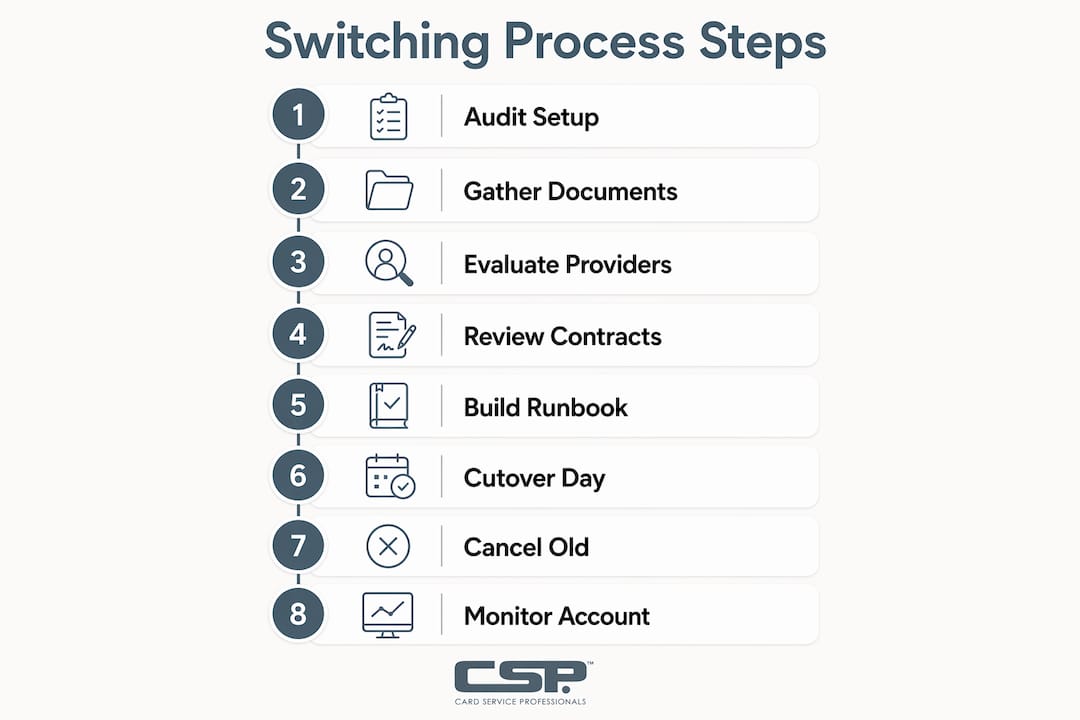
Switch merchant service providers safely by auditing your contract, inventorying your hardware and integrations, selecting a new provider, completing underwriting, running both processors in parallel for 2–4 weeks, and then reconciling final settlements before closing the old account. That sequence covers roughly 80% of what goes wrong when businesses change payment processors without a plan.
Here is a compact timeline to keep on your desk:
- Week 0–1: Pull your current contract, last 12 months of processing statements, and terminal inventory. Identify your ETF, notice period, and any auto-renew dates.
- Week 1–2: Shortlist new providers, request written quotes, and submit your underwriting application.
- Week 2–4: Complete underwriting (typically 2–10 business days), order hardware if needed, and configure your new gateway in a test environment.
- Week 4–6: Run sandbox testing, then begin parallel processing. Route new transactions to the new account; keep refunds and recurring jobs on the old one.
- Week 6–8: Full cutover during your lowest-volume window. Validate settlement batches, decline rates, and payout timing.
- Week 8–12: Monitor new account performance, reconcile chargebacks from the pre-cutover period, and cancel the old account in writing once all funds are settled.
Switching payment processors typically costs between 1% and 3% of your annual processing volume when you include ETFs, equipment replacement, integration work, and lost recurring revenue during the account-updater resync. On $500,000 in annual volume, that is $5,000–$15,000 in total migration cost. Plan for it.
Watch for buyout traps before you sign anything. When a new provider offers to “cover your ETF,” that is almost never a cash payment. It is typically a credit applied to their fees over 6–12 months, often tied to a new multi-year contract. Read the fine print before you treat it as free money.
Table of Contents
- Why do SMBs switch merchant service providers?
- How to audit your existing merchant setup before talking to new vendors
- What does the pre-switch checklist cover?
- How do you evaluate and select a new merchant service provider?
- What should you expect during underwriting and contract review?
- How do you build a migration runbook?
- How and when do you cancel the old account?
- What problems come up during a switch, and how do you fix them?
- What does switching actually cost, and how long does it take?
- Why headline rates lie and what the real costs look like
- Key Takeaways
- What most merchants get wrong about switching processors
- Card Service Professionals makes your migration straightforward
- Useful sources
Why do SMBs switch merchant service providers?
Switching is worth the effort when the current provider is costing you money, creating operational headaches, or putting your cash flow at risk. The most common reasons merchants decide to change providers fall into a short list:
- High effective rates: The headline rate looked good at signing, but monthly fees, statement fees, non-qualified surcharges, and gateway fees push the real cost well above what competitors charge.
- Unstable payouts or rolling reserves: Funds held for 5–7 days longer than expected, or a reserve that locks up 5–10% of volume, can create serious cash-flow strain.
- Poor dispute handling: A provider with no dedicated chargeback support leaves you fighting representment alone, which costs time and increases loss rates.
- Integration gaps: Your POS, e-commerce platform, or accounting software does not connect cleanly, forcing manual reconciliation every week.
- Hardware problems: Terminals that are slow, incompatible with EMV or NFC, or locked to a vendor you are leaving.
- Unresponsive support: When a terminal goes down on a Friday afternoon and no one answers, that is a revenue problem, not just an inconvenience.
Pro Tip: Before you commit to switching, calculate your effective rate: total fees paid divided by total volume processed. If the gap between your effective rate and a competitor’s written quote exceeds 0.3–0.5 percentage points on your volume, the math usually favors moving. If the gap is smaller, weigh the migration cost carefully.
A quick sanity check before you proceed: Is your current contract within 60–90 days of its end date? Do you own your terminals outright? Will the savings after migration costs exceed the switching expense within 12 months? If you can answer yes to at least two of those, switching is likely the right call.
How to audit your existing merchant setup before talking to new vendors
Before you contact a single new provider, spend two hours pulling together everything your current setup involves. Vendors will ask for most of this during underwriting anyway, and knowing it upfront gives you negotiating leverage.
Contract checklist
Pull your merchant agreement and look specifically for:
- Notice period: Most contracts require 30–90 days written notice before cancellation. Missing this triggers auto-renewal.
- ETF schedule: Flat fees commonly run in the low hundreds of dollars. Liquidated-damages clauses can multiply that by calculating average monthly fees over remaining contract months — a 3-year contract with 18 months left and $400/month in fees can produce a $7,200 ETF.
- Auto-renew clause: Many contracts roll over for 1–3 years automatically if you miss the cancellation window by even a day.
- Equipment lease terms: Check whether terminals are owned or leased, who holds the lease (often a separate leasing company), and what the return conditions are. Terminal leases commonly run 36–48 months at $39–$99/month — a fleet of three terminals could carry $4,000–$14,000 in remaining lease obligations.
- Liquidated damages language: Some contracts calculate damages on projected future revenue, not just fees. Flag this for a close read.
Documents and data to gather
| Document | Why You Need It |
|---|---|
| Last 12 months of processing statements | Calculate effective rate; identify fee categories |
| Merchant ID(s) | Required for underwriting and account transfer |
| Gateway configuration / API credentials | Needed for integration mapping and testing |
| Terminal inventory (model, serial, lease vs. owned) | Determines hardware replacement cost |
| Equipment lease agreements | Reveals remaining obligations and return conditions |
| Chargeback history (12 months) | New providers will request this; high ratios affect approval |
| Recurring billing list | Identifies stored-card tokens that need migration |
Pro Tip: To estimate your first-order switching cost, add: ETF + remaining lease payments + integration development cost + 2–4 weeks of parallel processing fees + projected revenue loss from stored-card declines during the account-updater resync window. That number is your true cost of switching, and it is the figure you should compare against projected annual savings.
Understanding your merchant processing contract types before you negotiate with a new vendor puts you in a much stronger position.
What does the pre-switch checklist cover?
This is where most migrations go sideways. The contract review tells you what it costs to leave; the pre-switch checklist tells you what it costs to move.
Hardware inventory
For every terminal and device in your location, capture:
| Field | What to Record |
|---|---|
| Device model and serial number | For return obligations and replacement matching |
| Owned vs. leased | Determines whether you can repurpose or must return |
| Vendor-assigned encryption keys | Some terminals are key-injected to a specific processor |
| Remaining lease term and monthly cost | Calculates stranded lease exposure |
| Expected replacement cost | Budget for new hardware if terminals cannot be reprogrammed |
Terminals that are key-injected to your current processor cannot simply be reprogrammed for a new one. You will need new hardware, which typically runs $200–$600 per device for a standard countertop terminal.
Integration matrix
| System | What to Verify | Estimated Dev Hours |
|---|---|---|
| E-commerce platform (Shopify, WooCommerce, etc.) | Plugin/connector available for new gateway | 2–8 hours |
| POS software | Native integration or API bridge required | 4–20 hours |
| Invoicing / billing software | Payment link or API compatibility | 2–6 hours |
| Subscription / recurring billing engine | Token portability, account-updater enrollment | 8–40 hours |
| Accounting software (QuickBooks, Xero) | Settlement import format compatibility | 2–4 hours |
| Gift and loyalty programs | Portability varies by vendor — confirm in writing | 4 hours |
Standard platform connectors typically cost $500–$2,500 in development time. Custom API rebuilds for bespoke checkouts can run 40–120 developer hours, which translates to $5,000–$20,000 depending on your developer’s rate.
On gift and loyalty programs: Portability is not guaranteed. Some providers lock gift card balances to their platform. Before you sign with a new vendor, get written confirmation that your gift card liability and loyalty point balances can be exported and imported — or that the new provider will honor existing balances. Discovering this after cancellation is expensive.
Pro Tip: List every place a customer’s card is stored in your systems: subscriptions, saved-card checkouts, invoicing tools, and loyalty apps. Each one is a migration touchpoint. Missing even one creates failed charges and unhappy customers.
How do you evaluate and select a new merchant service provider?
The best merchant service providers for your business are not necessarily the ones with the lowest advertised rate. Operational fit matters more than a basis point or two on interchange.

Selection criteria
Prioritize these factors in roughly this order:
- Risk posture alignment: Does the provider underwrite your industry category without imposing automatic reserves? A provider that treats your business type as high-risk will hold funds regardless of your history.
- Payout cadence: Next-day, 2-day, or weekly? The difference between next-day and weekly funding on $50,000/month in volume is real cash-flow impact.
- Reserve policy: What triggers a reserve? What percentage? For how long? Get this in writing, not in a sales call.
- Dispute support quality: Does the provider offer chargeback representment assistance, or do you fight disputes alone?
- Integration support: Will they assign a technical contact for your migration, or hand you a PDF and wish you luck?
- Hardware compatibility: Can they reprogram your existing terminals, or will you need to purchase new equipment?
- Scalability: Can the account handle your projected volume growth without triggering additional scrutiny?
Pricing dimensions to get in writing
- Effective interchange-plus estimate based on your actual card mix
- Monthly account fee and statement fee
- Chargeback fee per dispute
- Gateway fee (monthly and per-transaction)
- Terminal fee or rental cost if applicable
- Any ETF buyout credit terms, including the contract length tied to that credit
Questions to ask every vendor before signing
Ask these during your demo or RFP process and require written answers, not verbal assurances:
- What is the exact timing of my first payout after activation?
- What triggers a rolling reserve, and what percentage and duration applies to my account?
- Do you participate in Visa and Mastercard account-updater services?
- What format do you use for data exports, and can I export my full transaction history?
- What is your dispute-handling workflow, and what is your SLA for responding to chargeback evidence requests?
- Who is my dedicated support contact during migration, and what are their hours?
Payout timing, reserve behavior, and dispute handling are often the operational difference between providers — get written answers, not marketing statements.
Score each vendor on a simple 1–5 scale across those criteria before you make a decision. Do not cancel your current account until the new provider has confirmed your account is approved, your hardware is ordered, and your integration is tested.
What should you expect during underwriting and contract review?
Underwriting typically takes 2–10 business days for standard retail and restaurant accounts. Higher-risk categories can take longer. Prepare this documentation before you apply so you are not scrambling mid-process.
Underwriting document checklist
- Business registration documents (LLC, corporation, or DBA filing)
- Last 3–6 months of processing statements from your current provider
- Last 3 months of business bank statements
- Government-issued ID for each owner with 25%+ ownership
- Business website URL and screenshots of your checkout flow
- Proof of delivery or service model (for categories that attract chargeback scrutiny)
- Voided check or bank letter for settlement account
Reserve types explained
Rolling reserve: The provider withholds a percentage of each batch (commonly 5–10%) and releases it on a rolling 90–180 day basis. It does not disappear — it just releases in tranches. Capped reserve: Funds are withheld until the reserve reaches a fixed dollar amount, then withholding stops. Triggered reserve: Applied only when specific risk events occur (chargeback ratio spike, volume surge, fraud pattern). Know which type applies to your account before you sign.
For higher-risk merchant categories, reserves are common even with clean processing history. The key is knowing the trigger and duration upfront.
Contract clauses to review carefully
| Clause | What to Look For |
|---|---|
| Auto-renew terms | Notice window (often 30–90 days before anniversary) |
| ETF schedule | Flat fee vs. liquidated damages calculation method |
| Data ownership | Can you export full transaction history at any time? |
| Chargeback liability | Who bears liability for pre-cutover disputes? |
| Hardware liability | Damage, loss, or non-return penalties |
| Support SLA | Response time commitments in writing, not just marketing copy |
How do you build a migration runbook?
A runbook turns a stressful cutover into a checklist. Build yours before you start, not the morning of.
Migration steps in order
- Activate new merchant account and gateway credentials
- Configure test/sandbox environment with your integration team
- Export non-sensitive reporting data from the old account (transaction history, settlement records)
- Run full test suite in sandbox (see test cases below)
- Begin parallel processing window: route new card-present and online transactions to the new account
- Keep refunds, recurring billing, and outstanding disputes on the old account until reconciled
- Execute cutover checklist on a low-volume day (Tuesday or Wednesday morning works well for most retailers)
- Run post-cutover validation batch
Test cases to run before cutover
- Card-present sale (chip, tap, swipe)
- Full refund on a completed transaction
- Partial refund
- Recurring billing run with a stored card
- Saved-card retry after a soft decline
- Void before settlement
- Reporting reconciliation (does the batch match the settlement deposit?)
Sample cutover day schedule
| Time | Action |
|---|---|
| 7 AM | Confirm new gateway is live; verify test transaction settled overnight |
| 8 AM | Switch POS and e-commerce to new processor credentials |
| 9 AM | Process first live transaction; confirm receipt and settlement queue |
| 10 AM | Verify decline rate on first hour of live traffic |
| 12 PM | Mid-day check: batch totals, payout queue, any integration errors |
| 5 PM | End-of-day reconciliation; compare batch total to expected settlement |
| Next day | Confirm first settlement deposit arrived in correct amount |
Running both providers in parallel for 2–4 weeks reduces nearly all sales-loss risk at the cost of short-term duplicate fees. For most SMBs, that trade-off is worth it.
Pro Tip: For subscription businesses, do not migrate all stored cards at once. Stage the migration by billing cycle: move the next billing cohort to the new processor first, monitor decline rates for 7–10 days, then move the next cohort. The account-updater resync window typically runs 2–4 months — staggering the migration limits revenue leakage during that period.
How and when do you cancel the old account?
Canceling too early is one of the most common and expensive mistakes in a merchant migration. Here is the right sequence.
Cancellation steps
- Confirm the final settlement float timeline with your current provider (typically 2–5 business days after the last transaction batch).
- Keep the old account open and active for at least 30 days after cutover to handle refunds, chargebacks, and reconciliation on pre-cutover transactions.
- Export your full dispute and refund history before closing.
- Download and save your final processing statement.
- Submit written cancellation notice per the contract’s required method (certified mail, email to a specific address, or both). Keep a copy with a timestamp.
- Request written confirmation of cancellation and the final settlement date from the provider.
- Verify no additional fees are charged after the confirmed cancellation date.
Reconciliation checklist
- Match every pre-cutover settlement batch to your bank deposits
- Confirm all outstanding refunds processed correctly on the old account
- Identify any chargebacks filed against pre-cutover transactions and track their resolution timelines
- Reconcile the final statement line by line before closing the account
What to monitor on the new account (first 30–90 days)
- Payout timing: does the first deposit arrive when promised?
- Decline rate trends: watch for stored-card decline spikes during the account-updater sync window
- Chargeback activity: are pre-cutover disputes routing to the correct account?
- Reserve behavior: is the reserve percentage and release schedule matching what was agreed in writing?
- Cash-flow impact: does the new payout cadence align with your operating expenses?
What problems come up during a switch, and how do you fix them?
Most migration problems are predictable. Here is what to watch for and what to do when it happens.
- Stranded terminal hardware: You discover your terminals are key-injected to the old processor and cannot be reprogrammed. Fix: budget for replacement hardware before you start; get a written hardware compatibility confirmation from the new provider during vendor selection.
- ETF surprise: The ETF is higher than expected because of a liquidated-damages clause you missed. Fix: read the ETF calculation method in the contract before you give notice; ask the new provider if they offer a buyout credit and get the full terms in writing.
- Recurring billing failures: Stored-card tokens do not transfer, causing failed charges on the first billing cycle after cutover. Fix: stage the subscription migration by cohort and enroll in account-updater services on the new account before you move any stored cards.
- Large stored-card decline spikes: Decline rates jump 3–5 percentage points in the first 4–8 weeks. Fix: this is normal during the account-updater resync window; communicate proactively with affected customers and set up automated retry logic on soft declines.
- Unexpected reserve or payout delay: The new provider places a rolling reserve you were not told about. Fix: escalate immediately to your account manager with the written agreement as evidence; if unresolved, contact Card Service Professionals for advocacy with the acquiring bank.
For escalation, go to your dedicated account manager first with documentation in hand (the signed agreement, the written reserve terms, and the specific transaction records in question). If that does not resolve the issue within 48 hours, escalate to the acquiring bank directly. Card Service Professionals, as an independent agent representing multiple acquiring partners, can advocate on your behalf at that level.
PCI DSS and card-network rules apply throughout the migration. Cardholder data must remain protected under PCI DSS standards at every stage, and card-network dispute timelines (typically 30–120 days depending on the network) govern chargeback resolution regardless of which processor holds the account. Consult a qualified security assessor if your migration involves moving stored cardholder data between environments.
Watch for payment processing red flags in vendor behavior during and after the migration — vague answers about reserve triggers and payout timing are warning signs worth taking seriously.
What does switching actually cost, and how long does it take?
Timeline by scenario
| Scenario | Typical Duration |
|---|---|
| Card-present only (retail, restaurant) | 3–4 weeks |
| E-commerce with standard platform connectors | 4–8 weeks |
| Custom API integration or subscription business | 8–12+ weeks |

Underwriting accounts for 2–10 business days of that timeline. Hardware ordering and key injection adds 1–3 weeks. Integration and testing adds 2–6 weeks. The parallel processing window adds another 1–4 weeks on top.
Cost breakdown
| Cost Category | Typical Range |
|---|---|
| Early termination fee (flat) | Low hundreds of dollars |
| Liquidated damages (if applicable) | Varies; can reach several thousand dollars |
| Equipment replacement (per terminal) | $200–$600 |
| Standard connector / plugin development | $500–$2,500 |
| Custom API rebuild | $5,000–$20,000 |
| Parallel processing fees (2–4 weeks) | Varies by volume |
| Staff time (internal project management) | 30–90 hours total |
| Lost recurring revenue during updater lag | Depends on stored-card volume and decline rate |
Total migration cost typically lands at 1%–3% of annual processing volume. For most merchants, that range aligns with all-in costs for ETFs, equipment, integration work, and the account-updater decline window.
Pro Tip: Your best negotiating leverage is a contract end date and owned hardware. If you are within 60 days of your contract anniversary and own your terminals outright, you have almost no switching cost beyond integration work. Use that position to negotiate migration support, waived setup fees, or a hardware credit from the new provider — and get every commitment in writing before you give notice to your current provider.
Merchants with heavier integration or compliance needs may benefit from systems-integration support during the migration planning phase.
Why headline rates lie and what the real costs look like
The per-transaction rate a sales rep quotes you is not your cost of processing. It is the floor. What you actually pay depends on your card mix, your average ticket, your chargeback ratio, and a dozen fee categories that never appear in the headline.
The most important insight from merchant migration research: The best provider is not always the one with the lowest headline rate. Alignment of the provider’s risk management posture with your industry matters more — a provider that treats your category as elevated-risk will impose reserves and holds that cost far more than a few basis points on interchange.
Buyout offers deserve particular scrutiny. Buyout credits are commonly applied to the new vendor’s fees over a 6–12 month window and often include a new multi-year contract commitment. A $1,500 ETF buyout that locks you into a 3-year contract at rates 0.2 points above market costs you far more than $1,500 over the contract term.
The account-updater resync window is the other cost most guides skip. Stored-card and subscription businesses frequently see a 2–4 month window of higher declines while the new account’s updater and tokenization catch up. A modest increase in decline rate on meaningful monthly recurring revenue can equal thousands of dollars at stake each month.
Pro Tip: Request these items in writing from every provider before you sign: the exact buyout mechanics (credit vs. cash, timeline, contract tied to it), first-payout timing after activation, whether the provider participates in Visa and Mastercard account-updater services, and the specific reserve trigger thresholds for your account. A provider that hedges on any of these in writing is telling you something.
Negotiation checklist for evidence to require in writing:
- Buyout credit amount, application timeline, and any new contract term attached
- First payout date after account activation
- Account-updater participation confirmation (Visa VAU, Mastercard ABU)
- Reserve trigger conditions, percentage, and release schedule
- Data export format and frequency
- Support SLA with response time commitments
For merchants navigating complex platform or marketplace structures, legal considerations around payment models affect who holds regulatory responsibility and how reporting must be structured.
Key Takeaways
Switching merchant service providers safely requires auditing your contract and hardware before you talk to vendors, running both processors in parallel for several weeks, and keeping the old account open until every pre-cutover transaction is reconciled.
| Point | Details |
|---|---|
| Audit before you act | Pull your contract, ETF schedule, and terminal inventory before contacting any new provider. |
| Budget a moderate percentage of your annual volume | Total migration cost typically lands at 1%–3% of annual processing volume when you include ETFs, hardware, integration, and lost recurring revenue. |
| Run parallel processing | Keep both accounts active for 2–4 weeks to eliminate sales-loss risk during cutover. |
| Watch the buyout fine print | ETF buyout offers are usually fee credits over 6–12 months, often tied to a new multi-year contract. |
| Card Service Professionals | As an independent agent for multiple U.S. acquiring partners, Card Service Professionals reviews contracts, negotiates migration support, and advocates on your behalf through the full switch. |
What most merchants get wrong about switching processors
The conventional wisdom says switching merchant service providers is mostly about finding a lower rate. That framing sends merchants straight into the most expensive traps in the industry.
The rate conversation is a distraction until you have resolved three things: what it costs to leave your current provider, whether your hardware and integrations can move cleanly, and whether the new provider’s risk posture actually fits your business. A merchant who switches from 2.4% to 2.1% effective rate but triggers a 10% rolling reserve on the new account has not improved their cash flow. They have made it worse.
The buyout offer is the other place where merchants consistently underestimate the trade-off. A new provider covering your ETF feels like a win. But if that credit is spread over 12 months of fees and comes with a 3-year contract, you have traded a one-time cost for a multi-year obligation. The math only works in your favor if the new provider’s rates are genuinely better over that full term.
The account-updater window is the issue almost no one prepares for. Subscription and stored-card businesses that cut over without staging the migration often see decline rates climb for 2–4 months. That is not a failure of the new processor. It is a predictable consequence of tokenization resync, and it is entirely manageable if you plan for it. Stage the migration by billing cohort, enroll in account-updater services on day one, and set up automated retry logic before you move a single stored card.
The merchants who switch cleanly are the ones who treat the migration as a project, not a phone call. They pull the documents, map the integrations, test in sandbox, run parallel, and reconcile before they cancel. That process takes 4–12 weeks depending on complexity. Merchants who try to compress it into a weekend usually pay for it.
Card Service Professionals makes your migration straightforward
Switching processors is a project most SMBs run once every few years. Card Service Professionals does it constantly, across dozens of business types, representing multiple U.S. acquiring partners. That means when you work with the team, you get a contract review that actually catches the liquidated-damages clause, a hardware assessment that tells you what you own versus what you owe, and a migration plan built around your specific integrations and billing structure.

The services Card Service Professionals provides for merchant migrations include:
- Contract and ETF review before you give notice
- Lease analysis and stranded-hardware cost calculation
- Integration coordination with your POS, e-commerce, and billing platforms
- Staged cutover support with a parallel-processing plan
- Dispute and chargeback advocacy with the acquiring bank
- Onboarding training for your staff on new terminals and reporting tools
Card Service Professionals represents multiple acquiring partners and negotiates migration support on your behalf, which means you are not locked into one option and you are not navigating the process alone. There are no surprise fees for migration scoping.
Ready to see what a cleaner, lower-cost processing setup looks like for your business? Start your application or visit Card Service Professionals to talk through your current contract before you make any moves.
Useful sources
The claims in this guide draw on the following sources. For statistical claims about migration costs, timelines, and buyout mechanics, neutral and non-vendor sources are preferred.
| Source | How It Supports This Article |
|---|---|
| GuidingDecisions: What Switching Payment Processors Actually Costs | Cost ranges (1%–3% of annual volume), ETF structures, equipment lease data, account-updater decline window, buyout credit mechanics |
| Merchant Connect: How To Switch Without Downtime | Parallel processing recommendation, payout/reserve/dispute operational differences, risk posture alignment |
| Vecosys: Questions Before Switching Payment Processors | Vendor Q&A framework: first-payout timing, reserve triggers, data-export formats, account-updater participation |
| PayCompass: How To Switch Your Merchant Services Provider | Step-by-step operational checklist, gift/loyalty portability, terminal ownership verification |
| PCI Security Standards Council: PCI DSS Quick Reference Guide | PCI DSS compliance requirements applicable during cardholder data migration |
| American Bar Association: Building a Payment Rail | Legal and regulatory models for platform payment structures |
| Card Service Professionals | Service descriptions, merchant account structure, contract types, and migration support offerings |
This article is general information for planning purposes, not legal, financial, or compliance advice. Confirm current contract terms, fee schedules, and regulatory requirements with your provider and a qualified professional before making any changes to your payment processing setup.
Recommended
- Top Reasons to Switch Merchant Processor in 2026 – Card Service Professionals
- What Is Merchant Services? A Guide for U.S. Retailers – Card Service Professionals
- Aggregator vs Merchant Account: A U.S. Retail Guide – Card Service Professionals
- Accepting Payments on the Go: A Retail Merchant’s Guide – Card Service Professionals
