



A payment processor is a third-party service that manages the secure transfer of electronic payment data between a customer, a merchant, and their respective banks. Every time a shopper swipes a card at your register, a payment processor is the engine running the transaction behind the scenes. Understanding how this works gives you real leverage when choosing the right solution for your store. This guide breaks down how processors operate, how they compare to related tools like payment gateways and payment terminals, what fees to expect, and how to pick the right fit for your retail business.
What is a payment processor and what does it actually do?
A payment processor is the service that captures, encrypts, and routes payment data securely between your customer, your business, and the banks involved in the transaction. Think of it as the traffic controller for every card payment you accept. Without it, your register has no way to talk to a bank.
Processors work with credit card networks like Visa, Mastercard, American Express, and Discover. They also connect to the acquiring bank (your business bank) and the issuing bank (your customer’s bank). The processor sits in the middle, making sure money moves correctly and securely.

A closely related term is payment service provider, or PSP. A PSP acts as an intermediary between merchants, customers, banks, and financial institutions to simplify acceptance of multiple payment methods. PSPs also manage compliance, fraud monitoring, and reporting on behalf of merchants. The practical difference is that a PSP often bundles processing with other services, while a standalone processor focuses purely on transaction routing.
How does a payment processor work in retail?
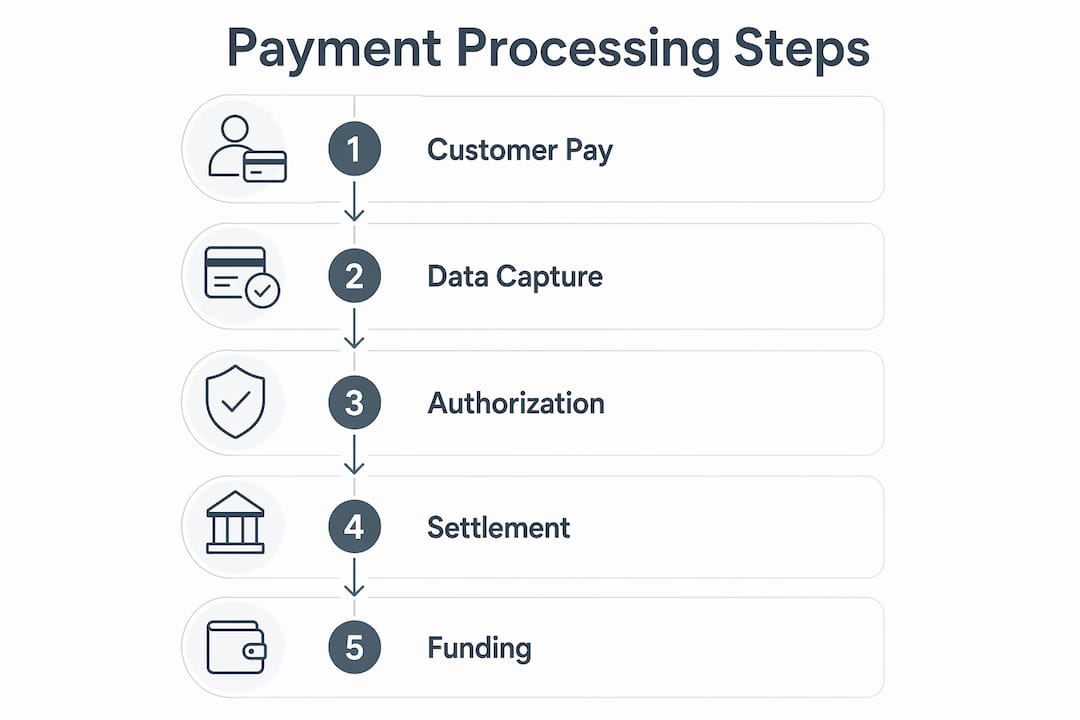
The transaction flow is faster than most people realize, and it happens in a precise sequence every time a customer pays.
- Data capture. Your customer taps, dips, or swipes their card at the payment terminal. The terminal reads the card data and sends it to your payment processor.
- Encryption and routing. The processor encrypts the data and routes it to the card network (Visa, Mastercard, etc.), which forwards it to the customer’s issuing bank.
- Authorization. The issuing bank checks the account for sufficient funds and approves or declines the transaction. This response travels back through the same chain in seconds.
- Settlement. At the end of your business day, the processor batches all approved transactions and initiates the transfer of funds from the issuing bank to your acquiring bank.
- Deposit. Funds typically land in your merchant account within one to two business days, depending on your processor and agreement.
The processor also handles PCI DSS compliance and fraud monitoring throughout this process. That compliance layer protects you from liability if card data is compromised during a transaction.
Pro Tip: Always confirm that your processor handles PCI DSS compliance on your behalf. Some providers pass that responsibility to the merchant, which creates hidden costs and legal exposure.
Common payment methods your processor will handle include EMV chip cards, magnetic stripe cards, NFC contactless payments (like Apple Pay and Google Pay), and PIN debit transactions.
Payment processor vs. payment gateway vs. payment terminal
These three terms get mixed up constantly, and the confusion costs retailers money when they buy the wrong tools or sign the wrong contracts. Here is how they differ.
A payment terminal is the physical hardware at your checkout counter. It captures payment data through card swipes, EMV chip insertions, and NFC contactless taps. Payment terminals communicate payment data to banks for authorization in milliseconds, supporting multiple card and contactless methods. The terminal is the customer’s touchpoint. It does not process the transaction itself.
A payment gateway is software that authorizes payments, primarily for online or card-not-present transactions. It encrypts card data and passes it to the processor. If you sell on a website alongside your physical store, you need a gateway for the online side.
A payment processor manages the entire transaction lifecycle, connecting all the parties together and handling settlement.
| Component | Type | Primary Role | Used For |
|---|---|---|---|
| Payment Terminal | Hardware | Captures card data at point of sale | In-store retail transactions |
| Payment Gateway | Software | Authorizes card-not-present payments | Online and e-commerce sales |
| Payment Processor | Service | Routes, settles, and manages full transaction | Both in-store and online |
For most retail businesses with a physical location, you need a terminal and a processor at minimum. If you also sell online, add a gateway. Many modern processors bundle all three functions into a single platform, which simplifies your setup considerably.
What are the fees and costs involved?
Payment service provider fees are structured either as a percentage of each transaction or as a fixed per-transaction charge. Most retail businesses encounter a blend of both. Knowing the difference helps you forecast costs and spot unfavorable contract terms before you sign.
Fees and costs vary widely based on merchant volume, payment types, and service bundles such as fraud protection and reporting. A high-volume retailer processing $500,000 per year will pay very different effective rates than a boutique doing $80,000 annually.
Key cost considerations for retail business owners:
- Interchange fees. Set by card networks like Visa and Mastercard. These are non-negotiable and passed through to you by the processor.
- Processor markup. The fee your processor adds on top of interchange. This is where negotiation happens.
- Monthly fees. Some processors charge a flat monthly fee for account access, reporting tools, or customer support.
- Hardware costs. Terminals, wireless payment devices, and POS equipment can be purchased or leased. Leasing is almost always the more expensive long-term option.
- Chargeback fees. Charged when a customer disputes a transaction. Fees typically range from $15 to $25 per incident.
- Cash discount program fees. Some processors offer programs that pass processing costs to card-paying customers, reducing your net cost to near zero.
PSPs like Square or Stripe bundle many of these costs into a flat rate, which is predictable but often more expensive at higher volumes. A dedicated merchant services provider can offer lower interchange-plus pricing once your monthly volume justifies it.
How to choose the right payment processor for your store
Choosing a processor is not just about the lowest rate. The right solution fits your sales volume, your physical setup, and how your staff operates day to day.
Connectivity for your terminal. Payment terminals support multiple connectivity options including Wi-Fi, Ethernet, and 4G/LTE cellular. Terminals with fallback connectivity minimize transaction failures during peak hours. If your store loses internet during a Saturday rush, a terminal with cellular backup keeps you running.
Pro Tip: Ask your processor whether your terminal supports offline mode. Some devices can store and forward transactions when connectivity drops, so you never lose a sale.
Integration with your POS system. Retailers who treat terminals as integrated extensions of their broader POS systems see better operational efficiency than those using standalone devices. Your processor should connect cleanly to your inventory, sales reporting, and accounting software.
Additional factors to evaluate before signing:
- PCI DSS compliance support. Confirm the processor manages this on your behalf, not just assists with it.
- Contract length and early termination fees. Month-to-month agreements cost more per transaction but protect you from being locked into a bad deal.
- Customer support hours. Payment issues at 7 p.m. on a Friday need a real person on the phone, not a ticket system.
- Local versus global processors. A local payment processor or regional merchant services agent often provides faster support response and more flexible rate negotiation than a large national platform. For the best payment processing for a local service business, a regional agent who knows your market can be a real advantage.
PSPs fully manage payment processing and external network relationships, making merchants less dependent on banking institutions. That simplicity is valuable for new businesses. As your volume grows, however, a dedicated merchant account with a specialized processor typically delivers better rates and more control.
Key takeaways
A payment processor is the core service connecting your business, your customer’s bank, and your own bank to complete every electronic transaction you accept.
| Point | Details |
|---|---|
| Processor vs. PSP | A PSP bundles processing with compliance and reporting; a standalone processor focuses on transaction routing. |
| Terminal connectivity | Choose terminals with Wi-Fi, Ethernet, and cellular fallback to prevent downtime during peak hours. |
| Fee structure matters | Understand interchange fees, processor markup, and monthly costs before signing any merchant agreement. |
| Integration is critical | Your terminal and processor must connect to your POS system to maximize efficiency and reporting accuracy. |
| Local processors add value | Regional merchant services agents often offer more flexible rates and faster support than large national platforms. |
What i’ve learned after years in merchant services
Most retail business owners come to me focused on one thing: the rate. I understand why. Fees are visible and easy to compare. But in my experience, the rate is rarely where retailers lose the most money.
The real losses come from downtime. A terminal that drops connection during a lunch rush costs you more in lost sales and customer frustration than a quarter-point difference in your processing rate ever would. I have seen stores with excellent rates running on hardware that was not integrated with their POS, forcing staff to manually reconcile transactions every night. That labor cost adds up fast.
The other pitfall I see constantly is signing long-term contracts without reading the early termination clause. Some agreements carry termination fees of $500 or more. A processor that offers a great introductory rate but locks you in for three years is not a deal. It is a trap.
My honest advice: treat your payment setup the way you treat your lease. Read every line. Ask what happens if your volume changes. Ask who owns the terminal if you leave. Ask whether the processor will renegotiate your rate after 12 months of good history. The answers tell you everything about whether you are dealing with a partner or just a vendor.
— Jerry
How Cardserviceprofessionals can help your retail business
Cardserviceprofessionals works with retail business owners across the United States to find payment processing solutions that fit their actual needs, not just a generic package.

As U.S.-based sales agents for some of the world’s leading merchant service providers, Cardserviceprofessionals offers competitive rates and programs including cash discount options that can reduce your net processing cost significantly. Whether you need a wireless payment terminal for a mobile setup, a fully integrated POS solution, or a straightforward card reader for a single-location store, the team can match you with the right equipment and pricing structure. Visit Cardserviceprofessionals to explore your options or start your merchant application today.
FAQ
What is a payment processor in simple terms?
A payment processor is a service that securely moves payment data between your customer’s bank and your business bank to complete a card transaction. It handles authorization, encryption, and settlement on your behalf.
What is a payment terminal and how does it connect to a processor?
A payment terminal is the physical device at your checkout that reads card data via swipe, chip, or tap. It sends that data to your payment processor, which routes it to the appropriate banks for approval.
What is a payment service provider vs. a payment processor?
A payment service provider bundles processing, compliance, fraud monitoring, and reporting into one platform. A standalone payment processor focuses specifically on routing and settling transactions between banks.
What does a local payment processor offer that a national platform does not?
A local payment processor or regional merchant services agent typically offers more flexible rate negotiation, faster personal support, and a better understanding of your specific market conditions.
How do wireless payment terminals work for retail businesses?
Wireless payment terminals connect via Wi-Fi, Ethernet, or cellular networks to transmit card data to your processor. Models with multiple connectivity options protect against downtime when one network connection fails.
Recommended
- Card Service Professionals – Credit Card Processing Experts
- Sign Up Application – Card Service Professionals
- The CSP Advantage – Card Service Professionals
